Mai Woh Nahi Jo Kare Pyaar VN Template Code: Create a Tu Aake Dekhle Reel
Looking for the Mai Woh Nahi Jo Kare Pyaar Song Reels VN Template Code? This HilluBhai guide brings together the source’s Tu Aake Dekhle QR card, a straightforward import workflow and practical ideas for making the finished Reel feel personal. If you are learning different styles of short-video editing, our VN green-screen editing tutorial explains another useful approach.
HilluBhai • VN editing guide
Turn a simple memory into a thoughtful Reel
Use the original creator’s QR card, choose your own footage and give the edit a consistent mood.
Template details and availability
The Ghaus Editz source page, dated November 25, 2026, displays a VN template card titled Tu Aake Dekhle. The card names Ansari Sahab and shows @ge_xenter. Those labels are retained below; HilluBhai is the author of this tutorial, not the claimed creator of that template.
| Item | What we checked |
|---|---|
| Search topic | Mai Woh Nahi Jo Kare Pyaar / Tu Aake Dekhle |
| Editor | VN Photo & Video Editor |
| Source | Ghaus Editz song-template page |
| Card credit | Ansari Sahab / @ge_xenter |
| QR status | Image available; payload decodes as a VN template identifier |
| Import status | Not tested inside the mobile VN app; availability depends on the creator’s hosted template |
Original Tu Aake Dekhle VN QR code
Save the complete card at its original quality. Keep its white margins, QR pattern and creator labels intact. The card is a functional sharing image, so avoid adding filters, stickers or a new logo over it.
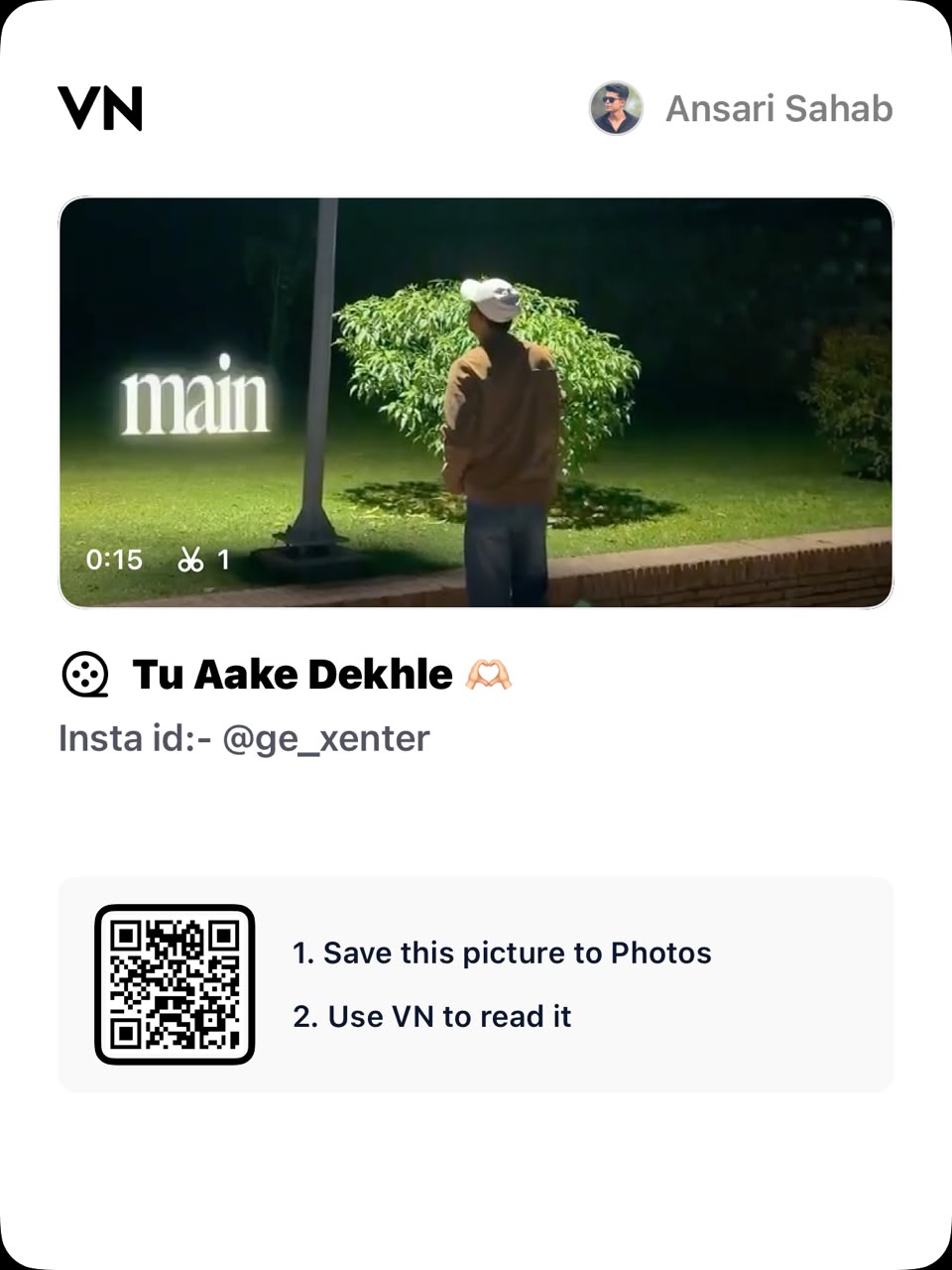
Verification note: We decoded the image to a VN template identifier. This confirms a readable QR payload, not a successful template download or completed export. Check the preview in VN before replacing your media.
How to import the code in VN
- Save the full QR image to your device, or display it clearly on another screen.
- Open VN and use its Scan tool to read the card. Where your version offers image selection, choose the saved card.
- Review the template preview and the creator information before downloading.
- If available, download the template, choose Use and select the requested media.
- Preview the filled edit, adjust the crop and save the project before exporting.
Menu wording can differ between versions. If access is restricted, expired or password-protected, follow the creator’s authorized instructions. No password or alternative template file is supplied here.
Choose footage that carries the mood
Pick a visual idea before choosing effects. A quiet evening walk, a candid portrait or a collection of travel memories can give the video a clear emotional direction. Use footage you own or have permission to edit, particularly when another person’s face is recognizable.
For a single portrait, start with a sharp image that leaves breathing room around the subject. For a sequence, choose pictures with similar lighting so the edit does not jump abruptly between unrelated looks. Do not assume a fixed photo count from the card alone; follow the slots that actually appear after import.
Make the Reel feel like your own
Preview the whole edit once before changing anything. Then correct the crop so faces and important details stay visible. If the template allows structural changes, use them sparingly: one deliberate movement can communicate more than several competing transitions.
For a manual version, try a slow opening, a clearer reveal near the musical change and a calm final frame. These are HilluBhai editing suggestions, not a description of untested template effects. If you add text, write a short original caption rather than covering the picture with long lyrics.
Suggested export checks
For a new vertical Reel, 9:16 and 1080 × 1920 are sensible starting choices when your project permits them. Match the frame rate to your footage, and inspect a short test export for blur or uneven motion. Increasing export resolution cannot restore detail missing from a low-quality source.
Watch the saved file with sound before uploading. Check the first frame, the final frame, text placement and whether any important subject is hidden by the platform’s interface. Use music through an authorized platform library or another permitted source; template access does not establish a separate music license.
Common problems and fixes
| Problem | Try this |
|---|---|
| QR does not scan | Use the full, clear original card rather than a compressed screenshot |
| Download fails | Check connectivity and whether the owner still allows access |
| Text or transitions cannot change | The creator may have limited editing permissions |
| Face is cropped | Reposition the media within the available crop controls |
| Export looks soft | Check the original media and export settings, then test again |
Before you publish
Keep a saved project so you can correct a crop or replace a picture later. Credit the template creator when sharing your result, and check that the selected soundtrack is permitted for your account and intended use. A clean edit with considered timing will serve your memories better than a promise of guaranteed viral reach.
Checked November 25, 2026. Topic and original QR card source: Ghaus Editz. Card credits: Ansari Sahab / @ge_xenter. Import reference: VN Help Center. Article and featured illustration: HilluBhai. Thumbnail is AI-generated editorial artwork, not an official template preview.


Post Comment