2026 Recap VN Template Code: Turn Your Memories Into a Reel
Your year deserves more than a camera-roll scroll
Build a personal 2026 recap with memorable moments, thoughtful pacing and a creator-shared VN code.
Searching for the 2026 Recap Reels VN Template Code? A strong recap turns ordinary phone footage into a story you actually want to watch again. Explore more HilluBhai VN editing guides, then use this walkthrough to understand the supplied code, prepare your memories and make an edit that feels personal.
What the supplied template card actually shows
The card displays the name Ansari Sahab, the Instagram credit @ge_xenter and the title “Kya kiya pure saal…?” Its preview shows 0:11 and a scissors symbol beside 1. Treat these as visible card details, rather than a guarantee about the current project. Check the loaded preview and media requirements before selecting your clips. HilluBhai has not created this template or verified that it contains GTA-style animation.
| Item | What is known |
|---|---|
| Source listing | Ghaus Editz, 2026 recap VN template article |
| Visible attribution | Ansari Sahab; @ge_xenter |
| Code format | VN template deep link embedded in a QR image |
| Import availability | Must be checked inside VN |
| Price and permissions | No independent confirmation; review creator terms |
The actual 2026 recap VN code
The text below is the exact payload decoded from the supplied image. It is a template identifier, not a numeric password, APK download or guarantee of access. VN’s QR importer is the intended starting point; an ordinary browser may not handle this app-specific address.
VN://template?uuid=adb7eda4be4942819a1f2db905e4c1cb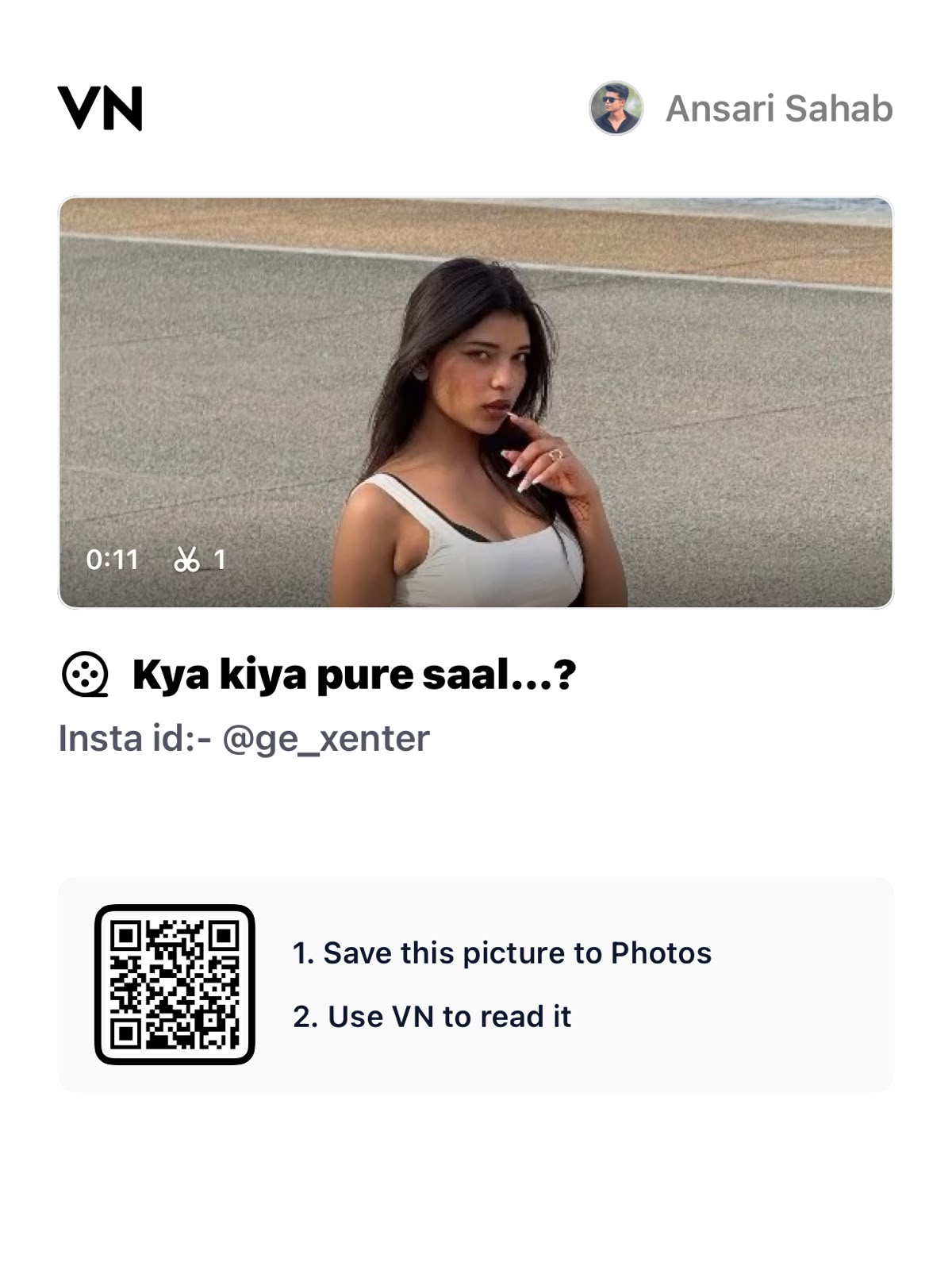
How to scan and use the template in VN
- Save the complete QR image. Keep its edges sharp and include the whole card. Avoid a blurry screenshot taken through another messaging app.
- Open VN and find its Scan control. Use the saved image through the scanner’s available photo-import option, or scan the card displayed on another screen. Controls can vary by app version.
- Inspect the loaded preview. Confirm the title, creator, required media and any access conditions. Stop if the destination does not match what you expected.
- Download and choose Use when available. Fill the slots requested by the app, proceed to the editor and review the result before exporting.
These are general VN template steps, not proof that this particular project will load today. A readable QR can still point to a removed, restricted or unavailable template. Never pay an unrelated account to “unlock” a code without checking the creator and the terms.
Choose memories that tell a story
Start with a small selection of moments: an everyday scene, a meaningful person, a place you visited and something you achieved. Put the strongest image near the beginning so viewers immediately understand the mood. A recap becomes more engaging when each shot adds something different, rather than repeating almost identical selfies.
As November 2026 is still in progress, label an early upload “2026 so far” or save the project for a December update. Ask permission before featuring other people’s private moments. Remove visible addresses, personal documents and details you would not want shared beyond your followers.
Give your edit a cinematic finish
If the template allows adjustments, keep your subject clearly framed and make text readable against both bright and dark footage. Use one consistent colour treatment. A game-inspired mood can come from strong contrast and poster-like titles, but adding official logos or unrelated gameplay is unnecessary. This is an independent editing guide, with no Rockstar Games affiliation.
Follow the template’s existing rhythm first. Watch once without sound to check visual flow, then again with audio to spot awkward cuts. Use music you are entitled to publish; finding a track inside a template does not automatically grant every commercial or platform use.
| Setting | Recommendation |
|---|---|
| Canvas | 9:16 for a full-height vertical Reel |
| Resolution | 1080 × 1920 when source quality supports it |
| Frame rate | Match footage; 30 fps is a practical starting point |
| Final check | Watch the exported file and review Instagram’s preview |
If the QR does not work
Try the original full-resolution image, update VN through its official app-store listing and check your connection. If the app reports that the template is unavailable, respect that result. Do not install a modified editor or download an unknown package to bypass it. You can still create an original recap manually: arrange your clips, trim them to a clear rhythm, add a short title and save your own project.
Can this guarantee a viral Reel?
No template guarantees reach. Clear storytelling, a recognisable opening and a satisfying ending give your edit a purpose, but audience response remains uncertain. Keep the creator attribution when sharing the template itself, check its permissions and let your own memories make the finished video worth watching.


1 comment